

Introduction and Project Background
In this case study, we explore how a Fintech marketing automation product was transformed from a WordPress-based Minimum Viable Product (MVP) into a full-scale web application built on Node.js and Vue.js. The product started as a WordPress site that offered basic marketing automation features for financial professionals – including content generation, social media post scheduling, email campaigns, and landing page creation – but the WordPress MVP increasingly struggled with performance and extensibility as the feature set grew. The team decided to migrate to a modern JavaScript stack to improve scalability, speed, and maintainability. This report details the migration process, how core functionality was rebuilt and enhanced, the integration of Artificial Intelligence (AI) tools for content generation and moderation, performance optimizations, and the implementation of two-way CRM integrations with Salesforce, Redtail, and Wealthbox. We will also discuss project management considerations for adding new features and suggest best practices (including custom data fields for contacts and leads).
Why Move Off WordPress? The WordPress MVP allowed fast initial development using plugins, but over time it became a “25+ plugin monster” that was hard to maintain . WordPress’s plugin-based architecture led to bloat and fragility – as one developer put it, “when it is built on WordPress the quality doesn’t really matter as the skeleton is a bloated mess” . Every plugin update risked breaking something, and performance suffered under the weight of many plugins and PHP-based processing. The team realized that scaling beyond the MVP would be difficult on WordPress without an ever-increasing tangle of plugins and custom PHP fixes. Furthermore, adding sophisticated new features (like AI-driven content tools or custom CRM integrations) would be easier with a custom codebase than within the confines of WordPress.
Why Node.js and Vue.js? The team chose Node.js for the backend due to its efficiency in handling concurrent requests and heavy I/O with non-blocking asynchronous architecture. Node’s event-driven, single-threaded model can serve high traffic with low resource usage, which was attractive after experiencing WordPress performance issues. In contrast to WordPress (which relies on PHP and is often constrained by the hosting environment and plugin overhead), Node.js offered a lightweight, high-performance solution where “its event-driven, non-blocking I/O makes it a high-performance solution for real-time applications,” ensuring faster response times even under heavy traffic . Vue.js was selected for the front-end to create a rich, reactive single-page application (SPA) user interface. Vue is a progressive framework that is approachable and performant, enabling a better user experience than the PHP-templated WordPress pages. By decoupling the front-end from the back-end (a “headless” approach), the new architecture would allow independent development, scaling, and deployment of the UI and server.
Project Planning & Management: Migrating an existing product is a significant project, so robust planning was crucial. The team adopted Agile methodologies, breaking the project into phases. In the first phase, the goal was to reproduce all essential features of the MVP on the new tech stack (Node/Vue) with at least parity in functionality. In the second phase, they would add enhanced features and improvements that were difficult to implement on WordPress (such as AI-driven content tools, a publishing calendar, and multi-tenant support for multiple companies). Product management involved gathering requirements from the existing system, prioritizing enhancements, and iterative development with feedback loops. The team maintained a backlog of new feature ideas (e.g. AI content generation, advanced automation, CRM integrations) and prioritized them based on user impact and technical feasibility. Importantly, the migration was not treated as a simple “lift-and-shift” – it was an opportunity to redesign the architecture and data models properly. The WordPress database (MySQL) schema and plugin behaviors were analyzed to ensure nothing critical was lost, but the new system’s database was designed from scratch to fit the application’s needs rather than mirroring WordPress tables. This allowed the data model to be cleaner and more aligned with the application domain (marketing content, campaigns, leads, etc.).
In the sections below, we detail the migration and development process, organized by major focus areas: rebuilding core features on Node/Vue, extending the product with AI and new tools, performance optimizations, and implementing CRM integrations. Code snippets and architecture diagrams are provided to illustrate key technical solutions and decisions. Lessons learned and best practices are summarized in the conclusion, highlighting how this migration improved the product and what challenges were encountered along the way.
Architecture Migration: From WordPress Monolith to Node.js & Vue.js
Migrating from WordPress to a Node.js + Vue.js architecture required a fundamental redesign of how the application was structured. Under the WordPress LAMP stack, the system was a monolith: PHP code (plus numerous plugins) ran on the server, rendering HTML on each request and directly accessing a MySQL database. The new architecture embraced a modern web app separation of concerns: a Node.js backend providing a JSON API (RESTful endpoints) and a Vue.js front-end as a single-page application (SPA) that consumes those APIs. This separation meant that all business logic, data retrieval, and integrations would reside in the Node server, while the Vue client would handle presentation and user interactions.
Backend Design (Node.js): The team chose Express.js (a minimalist web framework for Node) to build the REST API. The backend is responsible for core business logic such as managing content (articles, social posts, email templates), scheduling jobs (for posting or emailing at specific times), user management and authentication, and integrating with external services (AI APIs, CRM APIs, email servers, etc.). A new relational database schema was created (the team opted to continue with MySQL to easily migrate data from WordPress, though using PostgreSQL or MongoDB was also considered). Key tables included Users, Companies (for multi-tenant support), Contacts/Leads, Content (for storing generated content or templates), Posts, Emails, etc., normalized to avoid the quirks of WordPress’s schema (which had posts for many content types and meta tables).
In WordPress, much of the functionality had been provided by plugins (e.g., a plugin for forms, a plugin for social sharing, etc.). In the Node app, these had to be implemented in code or replaced by libraries/services. The development team identified which WordPress plugins were critical to replicate. For example, if the WordPress site used a plugin to schedule social media posts, the Node app would need a module to handle scheduling and API calls to social networks. Migrating these features involved writing custom code but with the benefit that the new implementations could be optimized to exactly what the product needed (unlike generic plugins that often include extraneous code, contributing to bloat ). This aligns with the experience that WordPress plugins are general and often do “a lot more than you need,” causing bloat when too many are used . By implementing just the needed functionality in Node.js, the new application could be more efficient.
Front-end Design (Vue.js): On the client side, a Vue.js SPA was created to provide a dynamic and responsive user interface. The Vue app interacts with the Node backend via REST API calls (using Axios or Fetch for HTTP requests). The UI was redesigned from the old WordPress theme to a modern web application UI, using a component-based architecture typical of Vue. This allowed for a “fully enhanced product UI” as requested – more responsive, with interactive dashboards and drag-and-drop where appropriate, and a cohesive look and feel (no longer constrained by the WordPress theme system). The team used Vue Router for single-page navigation and Vuex (or the newer Pinia) for state management to handle global states like user authentication info, currently loaded content, etc.
One big architectural decision was whether to use server-side rendering (SSR) or a purely client-side SPA. Given SEO was less of a concern (the product is a logged-in application for users, not a public website) and the development complexity of SSR, the team opted for a pure SPA initially. Protected routes ensure that only authenticated users access the app. For deployment, the Vue app would be built into static assets and served (e.g., via Node/Express static middleware or a CDN), and the Node API would be hosted on a server or platform.
Migration of Data: Content and user data from WordPress had to be migrated to the new database. The team exported relevant data from the WordPress MySQL (for example, blog posts or page content that users had created as part of the automation flows, user accounts, etc.). Some data like WordPress posts could be mapped to the new “content templates” or “articles” entities in the Node app. User accounts were a bit tricky – passwords had to be migrated securely (WordPress uses hashed passwords; the team wrote a script to transfer users and either keep the hashes if the same algorithm was used or require a password reset). Because the new system managed roles differently (e.g., distinguishing between end-user clients and internal users), a new user-role-permissions model was introduced.
It was acknowledged early on that this migration was not a weekend project. A commenter in the community warned, “you’re going to end up creating a lot of features by hand… migrating data… is not a weekend project” . This held true: the development team spent significant effort rewriting functionality that WordPress+plugins had provided and ensuring data consistency. However, the benefit was that those features were now tailored to the product’s exact needs and optimized for performance.
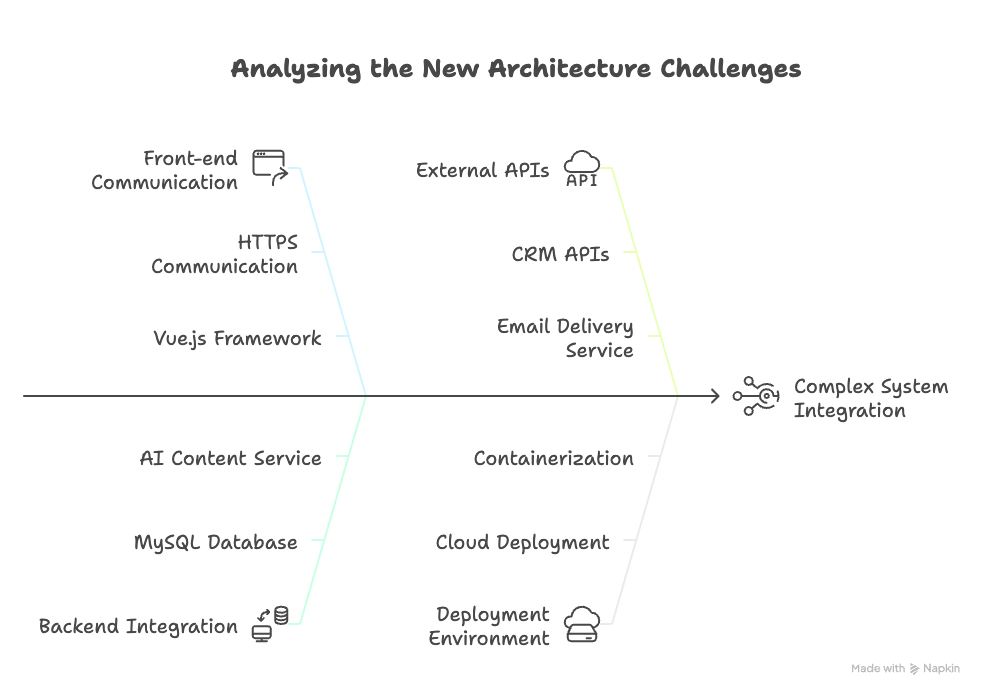
(Figure 1: Architecture Diagram – Node.js & Vue.js application with external AI and CRM integrations, replacing the previous LAMP/WordPress stack. The Vue.js client interacts with Node APIs, which connect to a MySQL database and third-party services like AI content generation APIs and CRM systems. Background workers handle scheduled tasks like sending emails or posting to social media.)
By establishing this modular architecture, the team set the stage for faster feature development and easier maintenance. Next, we’ll look at how core features were rebuilt in this new system.
Rebuilding Core Features on Node.js & Vue.js
After laying the groundwork for the new architecture, the development team focused on migrating and improving the core functionality that existed in the WordPress MVP. These core features included: (1) content creation tools, (2) social media posting automation, (3) an email campaign management tool, and (4) a landing page generator. Each of these was re-implemented using Node and Vue, often taking the chance to enhance or streamline the feature compared to the MVP version.
1. Content Generation Tool
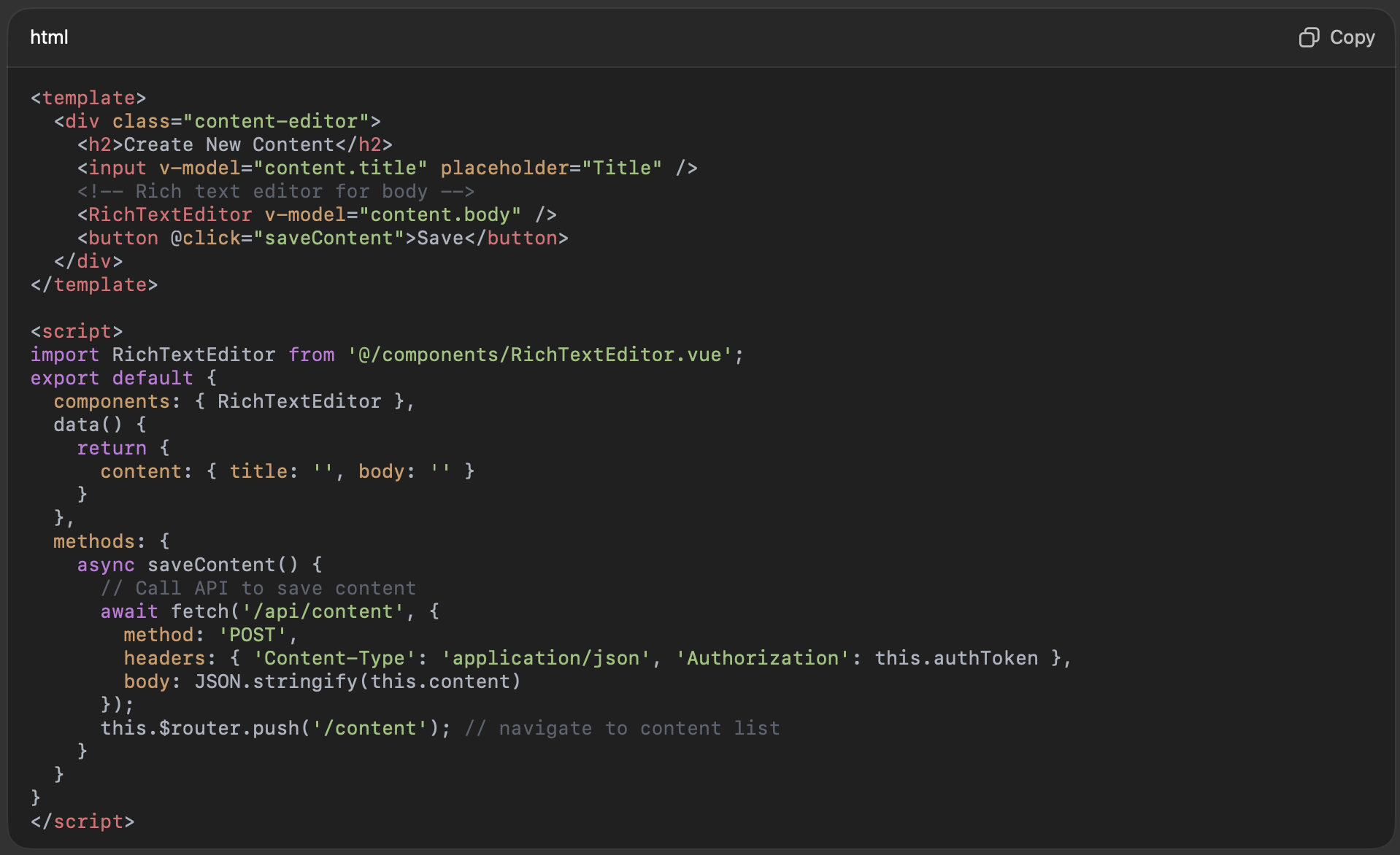
The original WordPress MVP allowed users (financial advisors and marketing teams) to generate or compile content, likely using a combination of pre-written templates or basic editors. In the new application, this feature became a more sophisticated content management module. Users can create content pieces such as blog articles, social media captions, or newsletter blurbs within the app. We built a rich text editor component in Vue (using a library like TipTap or Quill for WYSIWYG editing) for creating and editing content. Content entries are stored in the database with fields like title, body, category, tags, etc.
A sample Vue component might be structured as follows:
On the backend, an Express route handles the saving of content, for example:
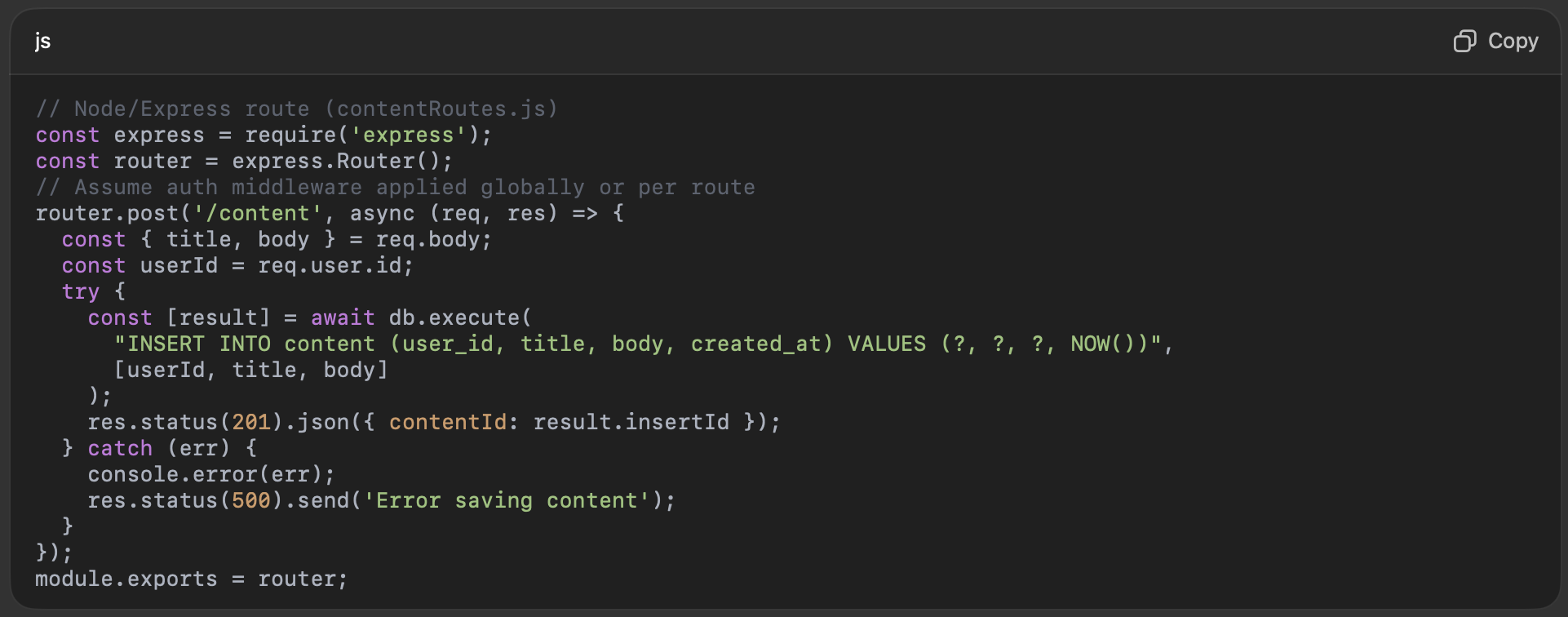
This content module set the foundation for later adding AI-powered content generation, which we will discuss in the next section. For now, the focus was on ensuring users had at least the same capabilities as the MVP (create, edit, store content), but with a more user-friendly UI and robust backend.
2. Social Media Posting Automation
A key selling point of the platform is helping financial firms maintain an active social media presence without manual effort. In the WordPress MVP, this might have been handled by a plugin or manual processes. In the new system, we implemented a Social Scheduler module. Users can connect their social media accounts (e.g., Twitter, LinkedIn, Facebook) via OAuth to the platform. Once connected, they can schedule posts to those networks at specified times, using content from the content library or new custom text.
Technically, integrating with social APIs involves using the providers’ SDKs or REST endpoints. For example, for Twitter (now X) one would use the Twitter API with OAuth1.0a or OAuth2. For LinkedIn, their REST API allows posting content to company pages or personal feeds, using OAuth2 for authentication. The Node backend stores the OAuth tokens for each user (encrypted) so it can post on their behalf.
We created a scheduling service: when a user schedules a post, the post details (content, target network, scheduled time) are saved to a “scheduled_posts” table. A background worker (for example, using Node’s node-cron or a queue library like Bull) runs periodically or listens for due jobs. When the scheduled time arrives, the worker fetches the post and calls the appropriate social media API to publish it. This decoupling ensures the web front-end is not tied up waiting for external API calls at the exact scheduled time.
Example: A snippet for scheduling a Twitter post using Node might look like:
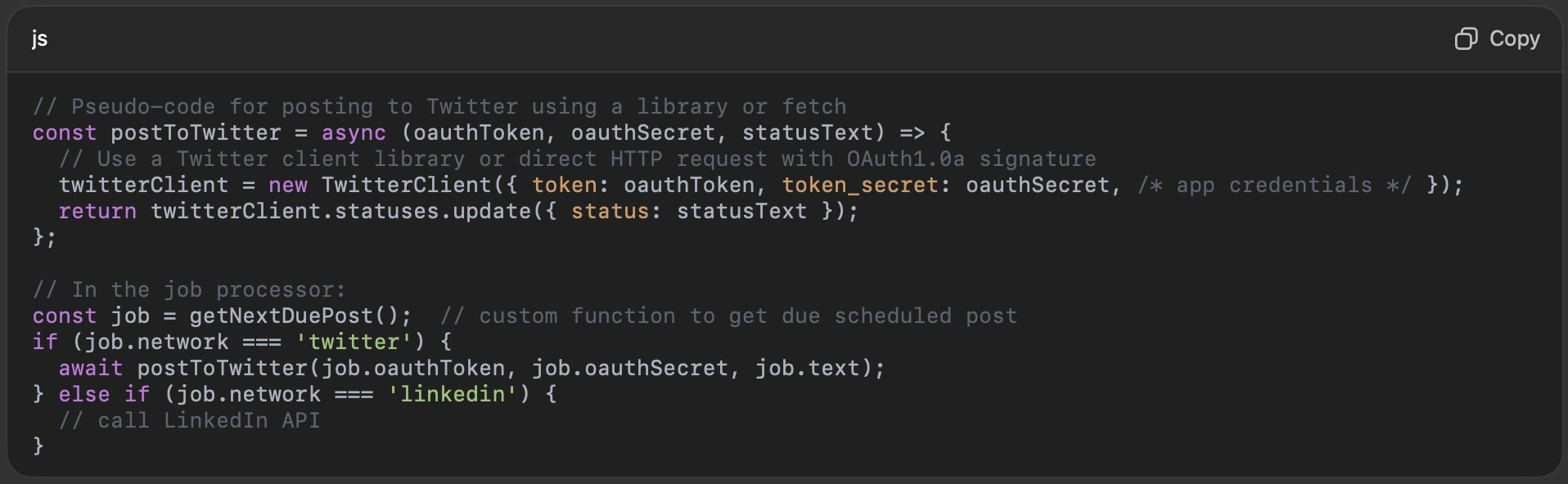
This automation frees users from having to manually post at specific times – they can queue up a week’s worth of social content and let the platform handle it.
From a product management perspective, adding this feature involved understanding the posting workflows of users. Early user feedback indicated that having a publishing calendar view would be useful – a calendar UI where users can see all scheduled posts and drag-and-drop to reschedule them. The team planned to implement a calendar view in Vue (using a library like FullCalendar) in the enhanced version of the product (Phase 2), as mentioned later.
3. Email Campaign Management Tool
The WordPress MVP likely used an email plugin or an external service for sending newsletters and drip emails. In the Node.js application, we built an Email Management module to design email campaigns, manage contact lists (the recipients), and track email performance (opens/clicks).
For composing emails, we integrated a simple HTML email editor (or allowed HTML upload). Many users prefer to pick from templates, so we created a few responsive email templates and allowed users to customize text and images. Emails are then scheduled or sent immediately to selected contact lists.
Email Sending: Rather than building an email server from scratch, the platform uses an email sending service (like SendGrid, Mailgun, or Amazon SES) via their Node.js SDKs or APIs. These services handle the low-level details of email delivery and provide webhooks for events (e.g., bounce, unsubscribe). The Node backend calls the service’s API when an email campaign is triggered. For example, using a service’s Node SDK:
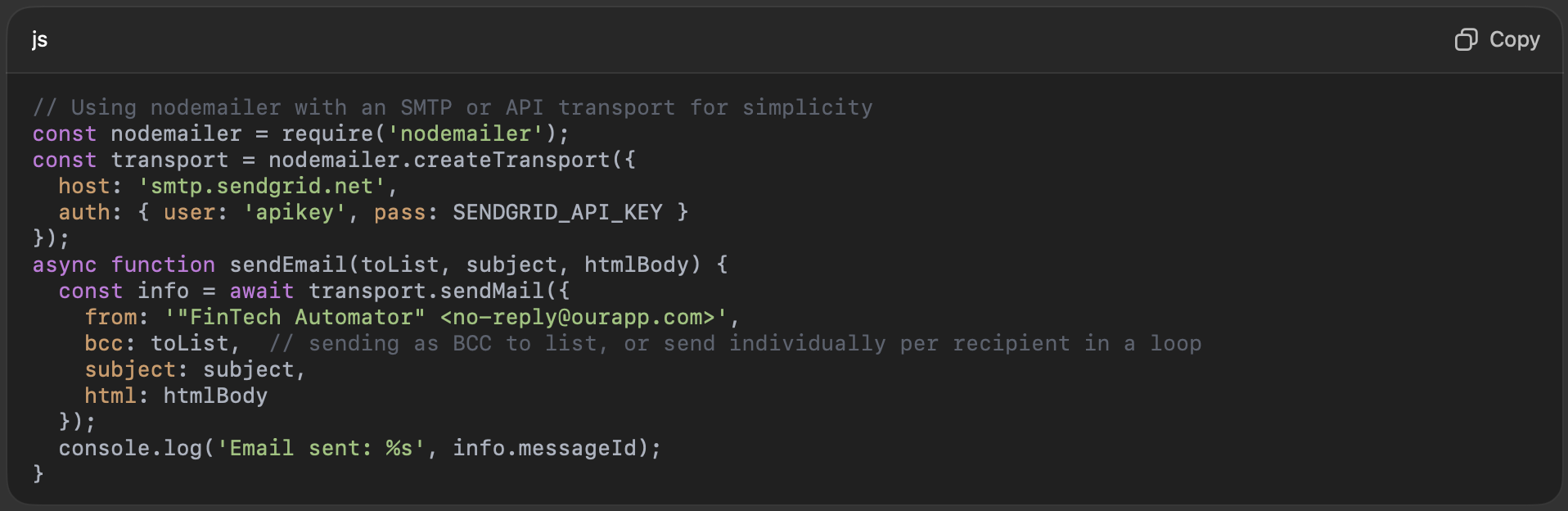
We also set up endpoints to handle webhook callbacks from the email service (to mark contacts as unsubscribed if they click “unsubscribe”, to record bounces, etc.). These updates flow back into our database so users can see which contacts are invalid or have opted out.
Managing contact lists was another crucial aspect. The platform maintained its own contact database (which can be synced with CRMs as discussed later). Users could create segments of contacts to target specific campaigns (e.g., a list for “High Value Clients” to send a premium newsletter). The Node API provides filtering capabilities for contacts (for instance, get all contacts where client_value > X or city = Y) to create dynamic lists.
4. Landing Page Generator
The MVP promised easy creation of landing pages for campaigns – e.g., a financial advisor could spin up a quick webpage for a specific seminar or offer, without needing a web developer. On WordPress, this might have been done via a page builder plugin or custom post types. In the new application, we implemented a Landing Page Builder tool. This feature allows users to assemble simple landing pages (hosted by our platform) by choosing a layout and filling in content. We provided a few template layouts (e.g., a lead-capture page with a form, a newsletter signup page, an event registration page, etc.).
From a technical standpoint, we decided to generate landing pages as standalone HTML pages that could be served quickly (even potentially via a CDN) for performance and isolation. Users fill out a form in the Vue app selecting template and content, and upon publishing, the Node backend generates a static HTML (and CSS) file for the landing page and stores it (either in the database or on cloud storage). The page is then accessible at a unique URL, e.g., https://app.ourproduct.com/landing/USERID/SomeCampaign. We mapped a route in Express to serve these pages by reading the file from storage.
For example, a simplified flow in code:
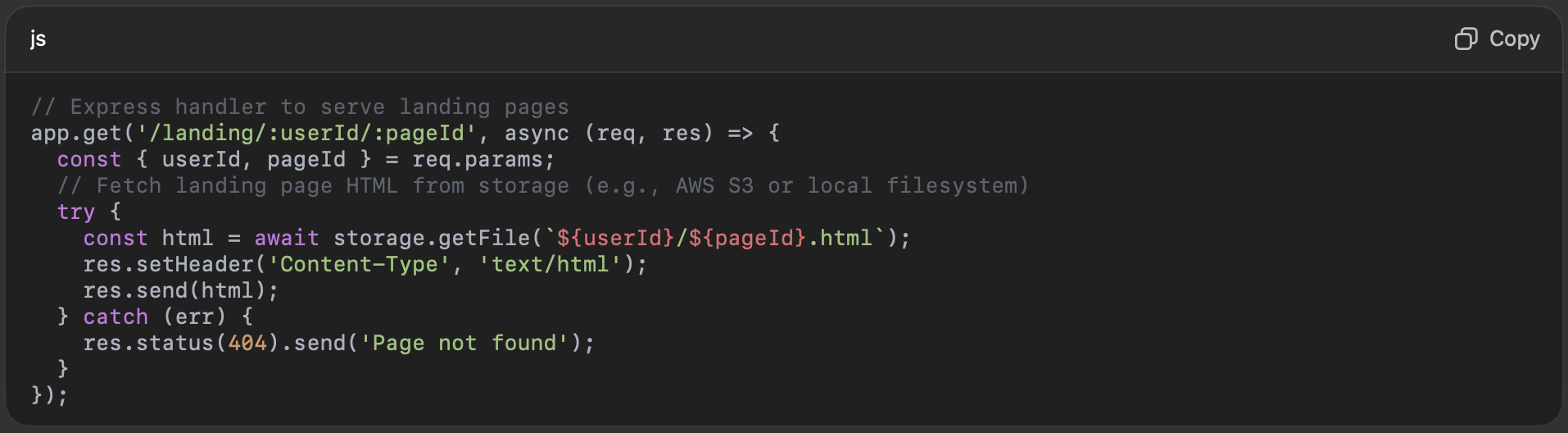
When a user creates a page, the server might do something like:

We also gave the option to embed a lead-capture form on these landing pages. If a landing page has a form (for example, to collect email addresses of visitors interested in a report), the form submission goes into our database (creating a new lead contact) and triggers a notification to the user. This required adding an open endpoint for form submissions (with CAPTCHA or other anti-spam measures since these pages are public).
Sample Landing Page Template (simplified HTML):
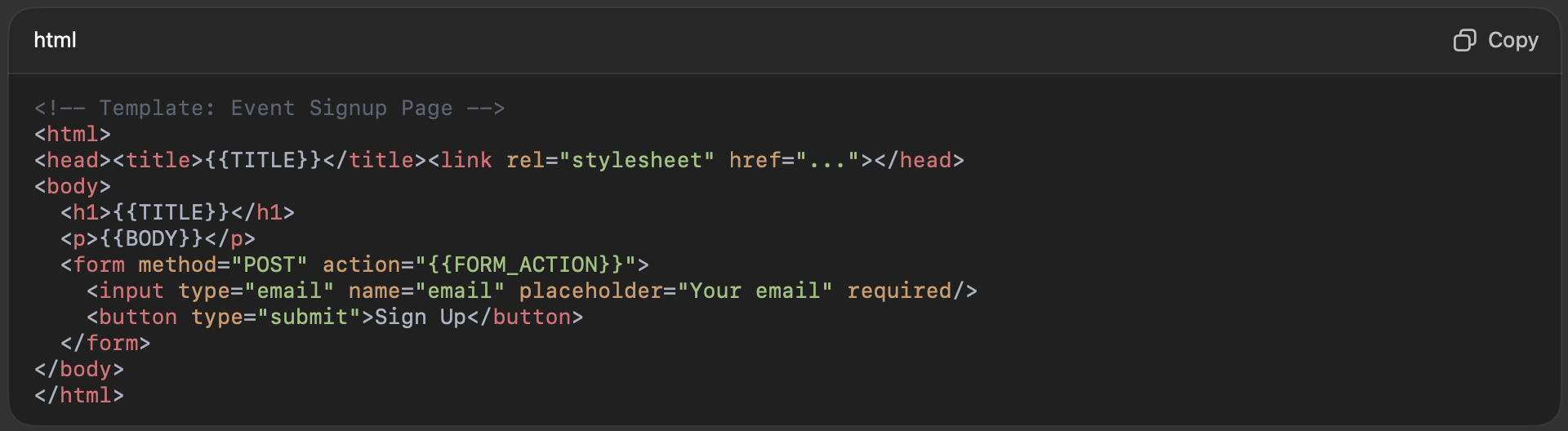
The application replaces the placeholders with the user’s content and a FORM_ACTION URL that points to our backend (e.g., /api/landing/submitForm?pageId=…). On the backend, that route saves the lead and perhaps sends a thank-you email or triggers an alert for the owner of the page.
By rebuilding these core features on the Node/Vue stack, we not only replicated the MVP functionality but set the stage for significant improvements. The new implementations were more integrated with each other – for example, content created in the content tool can be easily inserted into social posts or emails with a click, since all modules share the same database and UI. This cohesiveness was harder to achieve in WordPress where different plugins might not communicate well.
Moreover, the UI/UX improved greatly: instead of a generic WordPress admin interface, users now see a purpose-built dashboard with a unified design. The product management team conducted usability testing during this phase to ensure the new interface met user needs and was intuitive. Feedback from beta users of the new app was positive, noting faster load times and smoother interactions. The Node/Vue platform eliminated page reloads for most actions (thanks to Vue routing and Axios calls), making the experience feel more like a desktop application.
With the core in place, the team proceeded to Phase 2: adding advanced features that would differentiate the product, including AI capabilities, more automation, and a multi-tenant “company management” system.
Phase 2: Adding AI and Advanced Features
In the second phase of the project, we expanded the platform’s capabilities beyond what the original MVP offered. This included integrating AI tools for content generation and content validation, introducing more automation and planning tools like a content publishing calendar, significantly enhancing the UI, and building a company management system to support multiple organizations (tenants) using the platform. These additions aimed to provide a cutting-edge experience – for example, allowing users to automatically generate marketing content using AI and ensuring that content is compliant and high-quality through AI-based moderation. Below, we explore these enhancements one by one.
AI-Powered Content Generation
One of the most exciting upgrades was the incorporation of AI for content creation. Instead of expecting users to write all their own marketing copy from scratch, the platform now provides an AI Content Generator that can produce first drafts of blog posts, social media updates, emails, and more with just a brief prompt. This was implemented by integrating with a Large Language Model (LLM) API – specifically, the team chose OpenAI’s GPT-4 model (accessible via OpenAI’s API) for its state-of-the-art natural language generation capabilities.
From a user’s perspective, the feature works like this: in the content editor, they have an option “Generate with AI”. They provide a few keywords or a short description (e.g., “Topic: retirement planning for young families, Tone: friendly, 200 words”) and the system will call the AI API to generate a draft. The user can then edit or refine this draft as needed. This dramatically speeds up content creation for busy professionals. In fact, modern marketing teams are increasingly leveraging such tools – “AI content creation means software creates the content for you. It can write blog posts, social media copy, eBooks, landing pages, emails, product listings, and everything in between” . Our integration brought these capabilities into the platform seamlessly.
Technical Implementation: We added a new backend service to interact with the AI API. Using OpenAI’s Node.js client library, the code to generate content looks roughly like:
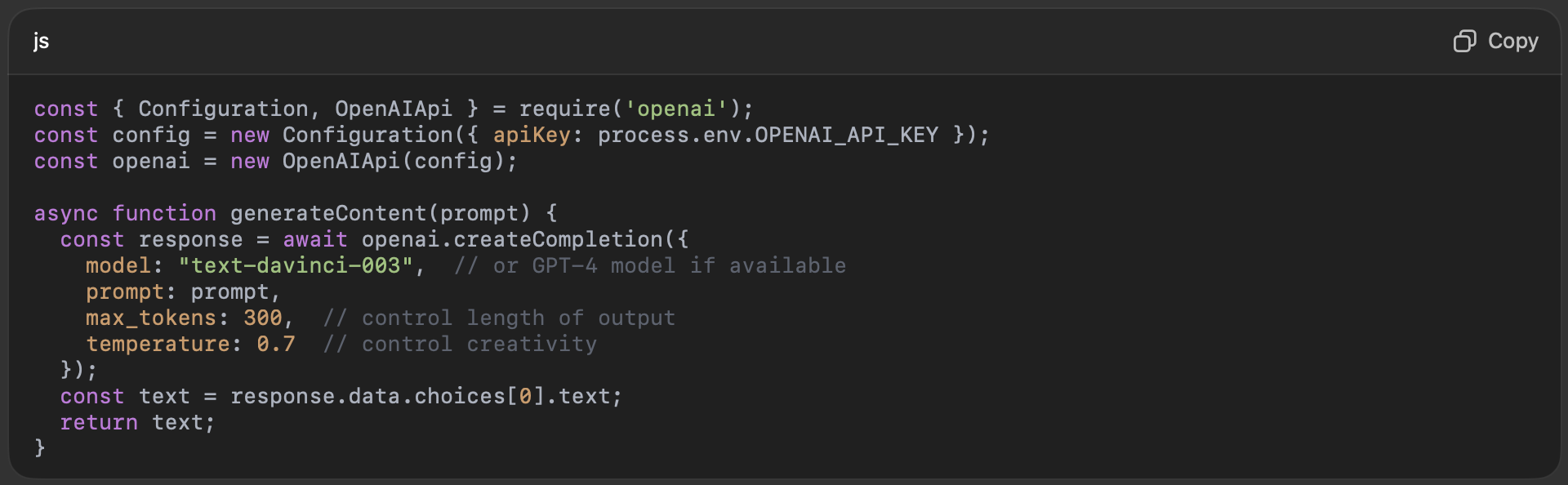
We exposed an endpoint /api/content/ai-generate that the Vue front-end calls with the user’s prompt. For example, if the user fills a form with fields like Audience, Topic, Tone, we construct a prompt string like: “Write a friendly blog post of about 200 words to an audience of young families about retirement planning.” The AI responds with a draft paragraph, which we return to the front-end to display in the editor for further editing.
Quality and Censorship (AI Content Validation): While AI can produce content quickly, it sometimes may generate content that is off-brand or even inappropriate. In a fintech context, compliance is crucial – the content must not make false promises, give inappropriate financial advice, or use disallowed terms. To address this, we incorporated content validation using AI as well. Specifically, after generation (or when users input any content to publish), we run it through a content moderation filter. This could be OpenAI’s content moderation endpoint or another third-party content safety API (such as Google’s Perspective API or Microsoft Azure Content Safety). These AI moderation tools automatically check text for issues like hate speech, harassment, profanity, or other specified categories. AI systems “efficiently filter harmful material, ensuring compliance with community standards” , which in our case means ensuring professional and compliant messaging.
For example, OpenAI’s Moderation API returns flags for categories. We implemented a check like:

If flagged comes back true (meaning the content likely violates some policy or contains something problematic), we alert the user that the content needs review or revision. In some cases, particularly for financial compliance, we defined custom rules – for instance, flagging any content that mentions “guaranteed returns” or other phrases that could be non-compliant in advertising. Those can be caught with simple keyword scans or using the AI to classify if the content might be giving financial advice.
To maintain user trust, we made the AI a helper rather than an uneditable authority. Users are encouraged to review AI-generated text. The platform provides suggestions and outlines via AI, but the human user makes the final call, which aligns with best practices (AI is used to assist, not fully replace human creativity ).
From a performance standpoint, calling AI APIs is an external HTTP request that can take a second or two. We handled this asynchronously in the UI (showing a loading spinner “Generating content…”). We also cached results for identical prompts to save on cost and latency if users accidentally repeat prompts.
More Automation Tools and Publishing Calendar
Beyond AI, Phase 2 included building more automation features that streamline marketing tasks:
Publishing Calendar: We introduced a calendar view where users can see all their scheduled content (social posts, emails, etc.) on a calendar timeline. This helps in planning an overall content strategy. The calendar view (in Vue) pulls from the schedule data in the backend (e.g., social_posts and email_campaigns tables with scheduled timestamps) and displays entries on a month/week view. Users can drag events to reschedule them, which triggers an update to the schedule in the backend via an API call.
Automated Workflows: The team added a simple workflow automation engine. For example, when a new lead is captured via a landing page, the system can automatically send a welcome email after 1 day, then a follow-up after 1 week. These kinds of drip campaigns were configurable by the user (somewhat like a light marketing automation workflow). We implemented this by allowing users to define triggers and actions in the UI (trigger could be “new contact added to list X” and action “send email template Y after Z days”). The backend has a scheduler that checks these conditions and executes actions. While not as complex as dedicated marketing automation software, this added more hands-off automation, which was a value proposition of our product.
Company Management System (Multi-Tenancy): Initially, our app was used by a single company. However, as we expanded, we needed the ability to host multiple companies (for example, multiple advisory firms) in one system, each with its own data segregated. We implemented a multi-tenant architecture where each piece of data is associated with a company ID (or tenant ID). The “Company Management System” refers to features that allow an administrator to manage their organization’s profile, team members, roles/permissions, and settings within the app. We added an admin panel for company admins to invite users, assign roles (e.g., Marketer, Advisor, Manager), and set branding (like company logo, which could reflect on their landing pages or emails). From a data perspective, every key table (Content, Posts, Contacts, etc.) got a company_id column so that queries always filter by the user’s company, ensuring isolation. We also updated our authentication system to handle users who may belong to multiple companies (in rarer cases) and ensure they only see the relevant data when they switch context. This feature was essential for scaling the product as a SaaS offering for many clients rather than a one-off tool.
Enhanced UI/UX: With Phase 2, we also gave the UI another upgrade to be “fully enhanced.” We incorporated feedback from Phase 1 users to refine workflows. This included: introducing dashboard analytics (so when a user logs in, they see key stats like how many posts went out this week, email open rates, new leads captured, etc.), improving navigation (clear menu sections for Content, Social, Emails, Calendar, Contacts, etc.), and generally polishing the look (using a UI library or custom design system for consistency). Performance was also optimized on the front-end by lazy-loading routes, optimizing bundle sizes, and employing caching of API calls where possible. The result is a much smoother app that feels modern and professional, which is critical for user adoption.
To illustrate an AI content generation usage, below is an example interaction with the platform:
User Story Example: A user wants to create a month’s worth of social media posts about retirement tips. They go to Content Library and type “Generate 5 tips about saving for retirement in your 30s.” The AI returns 5 bullet-point tips with explainer text. The user saves this content. Then they navigate to Social Scheduler and schedule each tip to be posted on consecutive Mondays to LinkedIn and Twitter. On the calendar view, they see each Monday is now filled with a scheduled post. The user also uses the Landing Page Generator to create a page for a free retirement planning e-book offer, and sets up an automated email such that anyone who fills the form on that page gets an immediate email with the e-book link (this is done via an automation rule connecting the landing page form submission (trigger) to sending an email (action)). The system, behind the scenes, ensures all this runs smoothly: AI generation took a few seconds per piece, content moderation checked that the tips were compliant (e.g., not making guarantees), scheduling ensured posts go out on time, and triggers for the landing page were set.
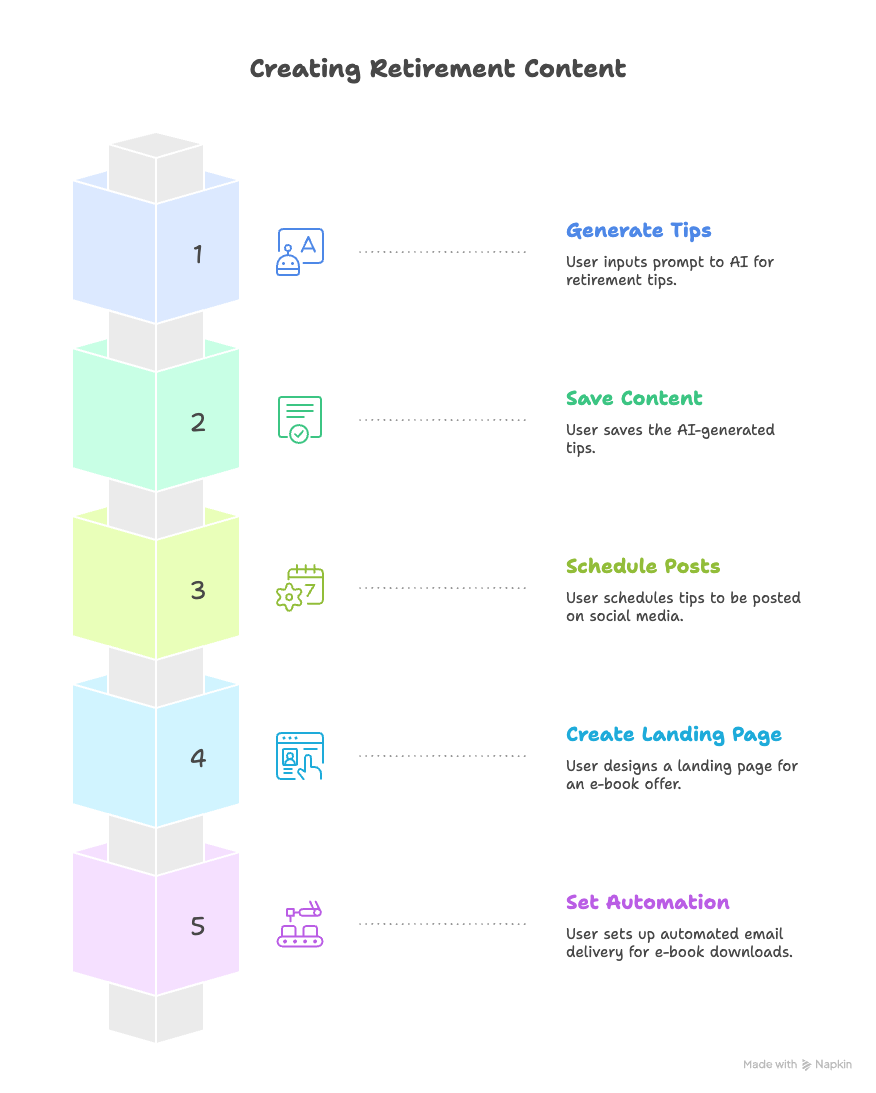
This level of integration between features is a big leap from the initial WordPress site, where these capabilities were either rudimentary or non-existent. The combination of AI and automation truly enhances productivity – something our team highlighted in marketing the new version.
On the note of AI moderation specifically, we used multiple techniques to ensure content quality: simple profanity filters, AI-based classification, and also human-in-the-loop moderation for some clients. For instance, an enterprise client might want to approve every AI-generated post before it goes live. Our system supports marking content as “pending review” if needed, so that an internal compliance officer can log in and approve it. AI helps flag obvious issues (the benefits of AI content moderation include scalability, consistency, speed, and cost-effectiveness in filtering content ), but we acknowledged it’s not foolproof. Therefore, the design included fail-safes so that users maintained control.
In summary, Phase 2 layered powerful new features onto the reliable base built in Phase 1. The use of AI aligned with industry trends of 2024-2025, where tools like Jasper, OpenAI’s ChatGPT, and others are becoming common in content marketing – specialized platforms like Jasper are known for generating high-converting marketing copy (emails, landing pages, etc.) for business users . By building our own AI integration, we kept users inside our ecosystem rather than having to use separate AI tools. This provides a competitive advantage and “wow factor” for the product.
Now that we’ve covered the application’s features and improvements, we’ll discuss how we tackled performance optimization – an area crucial for user satisfaction – and then dive into the specifics of integrating with external CRM systems for contact syncing.
Performance Optimization and Speed Improvements
A major driver for migrating away from WordPress was to speed up the application and improve scalability. WordPress, while convenient, had shown performance bottlenecks under modest traffic (the MVP site would sometimes become unresponsive when multiple users were performing tasks, and it required a lot of server resources to keep running smoothly). In the new Node.js + Vue.js application, we made several improvements to ensure the platform is fast and can handle growth in users and data.
Inherent Performance Gains from Tech Stack: Right out of the gate, moving to Node.js provided some inherent performance benefits. Node’s asynchronous, non-blocking runtime means it can handle many concurrent requests on a single process without thread blocking. For I/O-heavy operations (like querying the database or calling external APIs), Node excels by not idling threads. As noted earlier, “Node.js’s event-driven, non-blocking I/O… ensures faster response times, even under heavy traffic” . In our load tests, the Node server on the same hardware handled significantly more requests per second than the old WordPress PHP setup did. Also, the Vue.js front-end as an SPA meant that after the initial load, most interactions (creating content, scheduling a post, etc.) happened via AJAX calls and dynamic updates, rather than loading new pages. This makes the app feel snappy and responsive since only small chunks of data (JSON) are transmitted, not entire page reloads.
Efficient Caching and CDN Use: We implemented caching at multiple levels. For data that is frequently requested and not frequently updated (for example, a user’s content library or a list of social accounts), we enabled caching either in memory or using an external cache store (Redis). For instance, the result of GET /api/content-library could be cached per user so that if they navigate away and back to the library, the app can quickly fetch cached data. We invalidated the cache on any content update to ensure consistency.
On the front-end, we leveraged browser caching by setting appropriate cache-control headers for static assets (JavaScript bundles, CSS, images). We hosted the front-end assets on a CDN, which drastically improves global load times. The landing pages generated for campaigns were also suitable for CDN caching – they are static HTML, so they can be distributed worldwide for fast access, which is important if those pages are part of advertisements or email campaigns (visitors should experience a quick load).
Scaling the Server: The Node application was designed such that it could be horizontally scaled easily. Because it’s stateless (session information is stored in JWTs or in a shared database, and file uploads like images are stored on cloud storage), we can run multiple Node instances behind a load balancer. This is useful as our user base grows. In WordPress, scaling often requires more complex setups (like master-slave DB, or dealing with shared plugin state). With Node, we containerized the app using Docker and can deploy it on Kubernetes or similar orchestration to handle increasing load. We also took advantage of Node’s clustering on a multi-core machine to spawn worker processes to utilize all CPU cores.
Database Optimization: The MySQL database was tuned with proper indexing on columns that are commonly filtered (e.g., company_id, user_id, created_at on various tables). We also denormalized some data for performance – for example, storing a “search index” for content to speed up searching posts by keywords (rather than doing expensive wildcard searches on text fields at runtime). Given marketing data can grow large (many contacts, many sent emails logged, etc.), we also planned archiving strategies. For instance, email log data older than a year could be archived to a separate table to keep the main tables fast.
Profiling and Front-end Performance: We regularly profiled API response times and front-end rendering times. One particular area of improvement was reducing the JavaScript bundle size for the Vue app. By the time we added all Phase 2 features, the app bundle had grown. We employed code splitting (lazy loading routes), removed unused dependencies, and used tree-shaking to drop unused code. On the Node side, we made sure not to bloat the server with unnecessary libraries – something we were cautious about given the earlier experience of plugin bloat on WordPress. Now, every dependency was evaluated for necessity and impact.
During testing, we simulated concurrent usage and scenario-based load. For example, what happens if 1000 contacts submit a landing page form at once? The Node server plus database need to handle that insert load. We found MySQL could be a limiting factor for bulk inserts, so for bulk writes like importing a CSV of contacts or receiving a burst of form submissions, we batched operations and used asynchronous queues to smooth out spikes.
Client-Side Speed (SPA perceived performance): The SPA approach meant that users spend less time waiting. But we also needed to ensure the initial load is fast (first page load delivering the app). We used server-side compression (gzip or brotli for static files) and a lightweight landing login page so that users get into the app quickly. We also preloaded some data on initial HTML (for example, the user’s basic profile and settings could be embedded in the initial HTML to avoid an extra round-trip after loading the JS).
Comparison to WordPress MVP: The results of these efforts were dramatic. The page load time for the main dashboard went from several seconds on the WordPress site (which was loading a lot of scripts, plugins, and making many DB queries) down to well under 1 second on the Node/Vue app (after initial load, navigating between sections is near-instant). We essentially removed the overhead of WordPress core and plugins and replaced it with optimized code. As one article comparing Node and WordPress observed, WordPress performance depends heavily on the environment and plugins, whereas Node’s lightweight nature gives it an edge for fast, scalable apps .
We also mitigated the “fear of plugin updates” scenario entirely – the codebase is under our control and versioning. In WordPress, an update to a plugin or WordPress core could degrade performance or cause conflicts, and the MVP maintainers “feared every single update because [they] knew something was going to break” . Now, updates are managed in our own release cycle, and performance testing is part of QA before any new release.
In production, we monitored performance using APM tools (Application Performance Monitoring) to catch any slow endpoints or memory leaks. This helped ensure the app remained snappy over time. For example, if an API call was taking long, we could inspect if an N+1 query problem arose or if an external API (like AI or CRM) was slowing things – and then take measures like caching or asynchronous processing.
In summary, the move to Node.js and Vue.js, combined with careful optimization, resulted in a significantly faster and more scalable application. It set a foundation such that adding users or data would have linear or better scaling, instead of the steep resource requirements we saw with WordPress. The improved performance not only benefits end-users (through quicker load times and a smoother experience) but also reduces infrastructure costs (Node can do more with less CPU/RAM compared to the PHP stack we had, and we can better control scaling).
Next, we address one of the critical integration requirements: synchronizing contacts and leads with popular CRM systems (Salesforce, Redtail, and Wealthbox), which ensures the platform can fit into users’ existing workflows in the financial industry.
Two-Way CRM Integration (Salesforce, Redtail, Wealthbox)
Financial advisors and marketing teams often already use Customer Relationship Management (CRM) systems to manage their contacts, leads, and clients. Our platform needed to integrate with these systems to avoid data silos – users didn’t want to manually import/export contacts. The goal was a two-way sync with leading CRMs in the finance domain, namely Salesforce, Redtail CRM, and Wealthbox CRM. Two-way integration means that contacts and leads created or updated in our platform would be pushed to the CRM, and likewise changes made in the CRM (or new contacts added there) would be pulled into our platform, keeping both in sync.
This part of the project was complex, as it required understanding and interfacing with each CRM’s API and dealing with data mapping and consistency. We dedicated a significant portion of development to implementing robust synchronization jobs, handling authentication for each service, and designing our data model to accommodate fields from these CRMs.
API Access and Authentication
Each CRM provides an API (Application Programming Interface) for developers:
Salesforce: Salesforce has a very extensive API (both REST and SOAP) and uses OAuth 2.0 for authentication. We needed to register a Connected App in Salesforce to obtain a client ID/secret and set up the OAuth flow. Users of our platform can authorize the integration by logging into their Salesforce account via an OAuth prompt, which gives us an access token to act on their behalf. We used the popular jsforce library in Node.js to simplify calls to Salesforce. This library handles authentication and provides methods to CRUD Salesforce records.
Redtail CRM: Redtail is a CRM tailored to financial advisors. It offers a RESTful API with JSON responses. Authentication is typically done via an API key or access token tied to the user’s account. Redtail’s API allows managing contacts, accounts, opportunities, etc. We registered for a developer key and had the user input their Redtail API credentials in our app (securely stored). Redtail also has support for webhooks as per their documentation, meaning it can notify our app when changes occur (although this might depend on user’s subscription level). The Redtail CRM API is RESTful and supports webhooks for certain events . We leveraged webhooks where possible to get real-time updates from Redtail instead of constant polling. Additionally, Redtail imposes rate limits – for example, the free tier allows ~100 requests per minute, with higher tiers allowing more . We built our integration mindful of these limits, queueing requests if necessary, and using batch APIs when available to stay efficient.
Wealthbox CRM: Wealthbox is another financial advisor CRM with a modern REST API. It uses OAuth 2.0 for authentication similar to Salesforce. We had to register our application with Wealthbox to get client credentials. Wealthbox’s API allows reading/writing contacts, notes, tasks, etc. One limitation was that, at the time of development, Wealthbox’s API did not provide native webhooks for changes . This meant our app would have to periodically poll for changes or rely on scheduled sync jobs for two-way sync. We decided on a hybrid approach: immediate sync from our platform to Wealthbox on any change (so if a user updates a contact in our app, we call Wealthbox API immediately to update the record there), and scheduled polling from Wealthbox to our app (e.g., every 15 minutes) to catch any changes made directly in Wealthbox’s interface. We also provided a manual “Sync Now” button for users who want to trigger an immediate refresh from the CRM.
Architecture of Sync: We implemented a synchronization service in our Node backend for each CRM integration. This service handles both push (our app -> CRM) and pull (CRM -> our app). To minimize duplication, we designed a generic pattern but tailored to each API’s specifics:
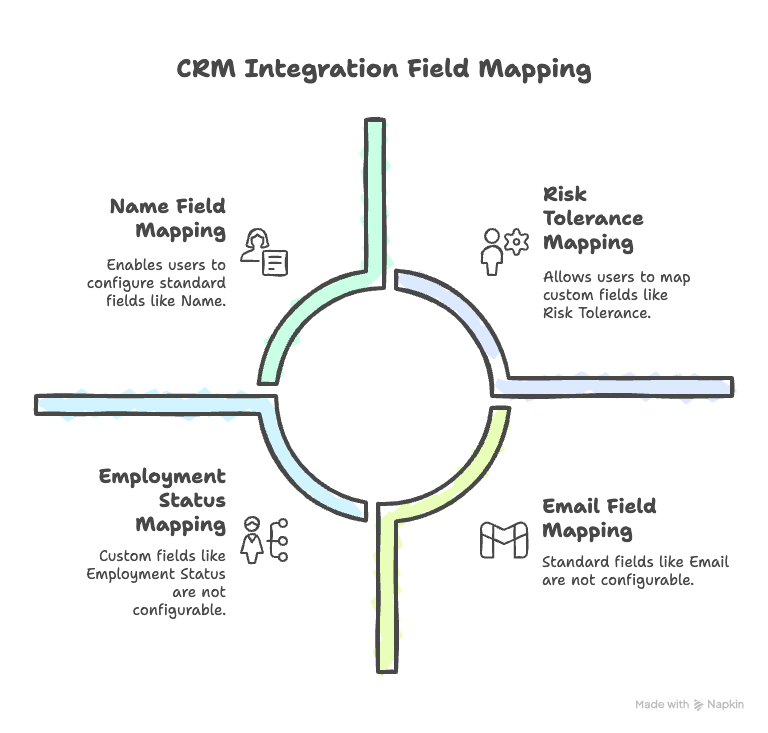
Mapping Fields: We created a mapping between our contact fields and each CRM’s fields. At minimum, we mapped standard fields: name, email, phone, address, etc. However, each CRM has custom fields and different data models. For instance, Salesforce distinguishes Leads and Contacts (and Accounts) as separate objects; Redtail might have specific fields like “Client Category” or “Servicing Advisor”; Wealthbox has “Households” etc. We focused on Contacts and Leads and their basic details as per the requirement, ensuring those entities sync properly. For custom fields, we allowed configuration. The user can specify additional field mappings via our settings UI – for example, they could map a custom field “Risk Tolerance” in our system to a field in Salesforce (if one exists in their Salesforce schema). Since “we have not defined those [fields] but you can suggest some,” we recommended some common custom fields that might be useful to track: e.g., Employment Status, Annual Income, Credit Limit, Target Retirement Age for financial context (these are often important data points in financial services ). We also suggested fields like Preferred Contact Channel, Lead Source, Social Media Profile URLs (which can be useful for marketing) . Our integration allows storing these, but effective syncing requires the CRM to have analogous fields. If not, we at least store them on our side.
Push to CRM: Whenever a contact or lead is created or updated in our platform, and the user has integration enabled, our system triggers a sync. For example, if a user edits a contact’s phone number in our app, our integration code will detect this and call the CRM API (Salesforce, Redtail, or Wealthbox as appropriate) to update that field in the CRM as well. Using Salesforce as an example with jsforce:

For Redtail, it might be a PUT request to /contacts/{id} with JSON body of updated fields. We handle the API call differences internally. We also queue these operations in case of API rate limits – e.g., if the user bulk imports 1000 contacts into our system, we don’t want to bombard Salesforce with 1000 API calls at once (to avoid hitting limits). Instead, we enqueue and process them with some concurrency control.
Pull from CRM: To sync changes the other way, we have background jobs that periodically fetch recent changes from the CRM. Many CRMs allow queries like “give me all contacts updated since X time.” Salesforce has Streaming APIs and change data capture features, but those can be complex to set up, so we often fallback to polling. For example, every 10 minutes, check Salesforce for any contact or lead that has LastModifiedDate greater than the last sync timestamp. If found, retrieve those records and update our database. For Redtail, which supports webhooks, we subscribed to events (like contact.modified) so Redtail would send an HTTP POST to our webhook endpoint when a contact changes. Our endpoint would then handle that event (verify it, then fetch the updated data via API and update our DB). Wealthbox without webhooks meant we definitely had to poll – their API might allow filtering by updated date as well; if not, we fetch all and do a diff (but that’s less efficient, so we used their updated-since filters).
Conflict Resolution: Two-way sync introduces the possibility of conflicting edits (e.g., user edits a contact in our app at the same time someone else edits it in Salesforce). To handle this, we implemented a basic strategy: last write wins, with a log of changes. We store a last_synced_at timestamp for each contact per system. If we pull a change from CRM that is newer than the last_synced_at, we apply it. If a push is initiated from our side, we always send the latest data. If the systems get slightly out of sync, the next sync cycle will correct it. For more complex needs, one could implement field-level reconciliation or prompt the user, but we aimed to keep it simple unless a user explicitly reports an issue.
Contact Linking: We needed to link records between systems. For instance, a contact in our system needs to know the corresponding Salesforce Contact ID (or Lead ID). We added fields like salesforce_id, redtail_id, wealthbox_id in our Contacts table to store the identifiers of linked records. During initial linking (like the first time integration is set up), we either matched contacts by email (common unique identifier) or allowed the user to manually confirm matches if needed. We also had an option to “import all contacts from CRM” which pulls all contacts from the CRM and creates them in our system if they don’t exist, and conversely an “export all to CRM”. After that initial seeding, the incremental sync keeps them aligned.
Security: We treated CRM data with high sensitivity. OAuth tokens and API keys were encrypted at rest. Access to the integration features in our app was permission-based (only authorized users could set up the sync). All communication with CRM APIs was over HTTPS. We also had to comply with Salesforce’s security review for connected apps (ensuring we follow their best practices).
Real-world Usage: Once implemented, this integration became a strong selling point. For example, if a financial advisor is using Redtail to keep track of clients, any new lead captured on a landing page via our platform will automatically appear in Redtail with all details (name, email, source, etc.) filled in. Conversely, if they meet a new prospect and add them in Redtail first, that contact will sync down and they can immediately include them in an email campaign in our platform. This eliminates duplicate data entry and ensures marketing actions are based on the latest CRM data.
To illustrate, consider a code snippet for pulling contacts from Wealthbox (using a made-up helper for clarity):
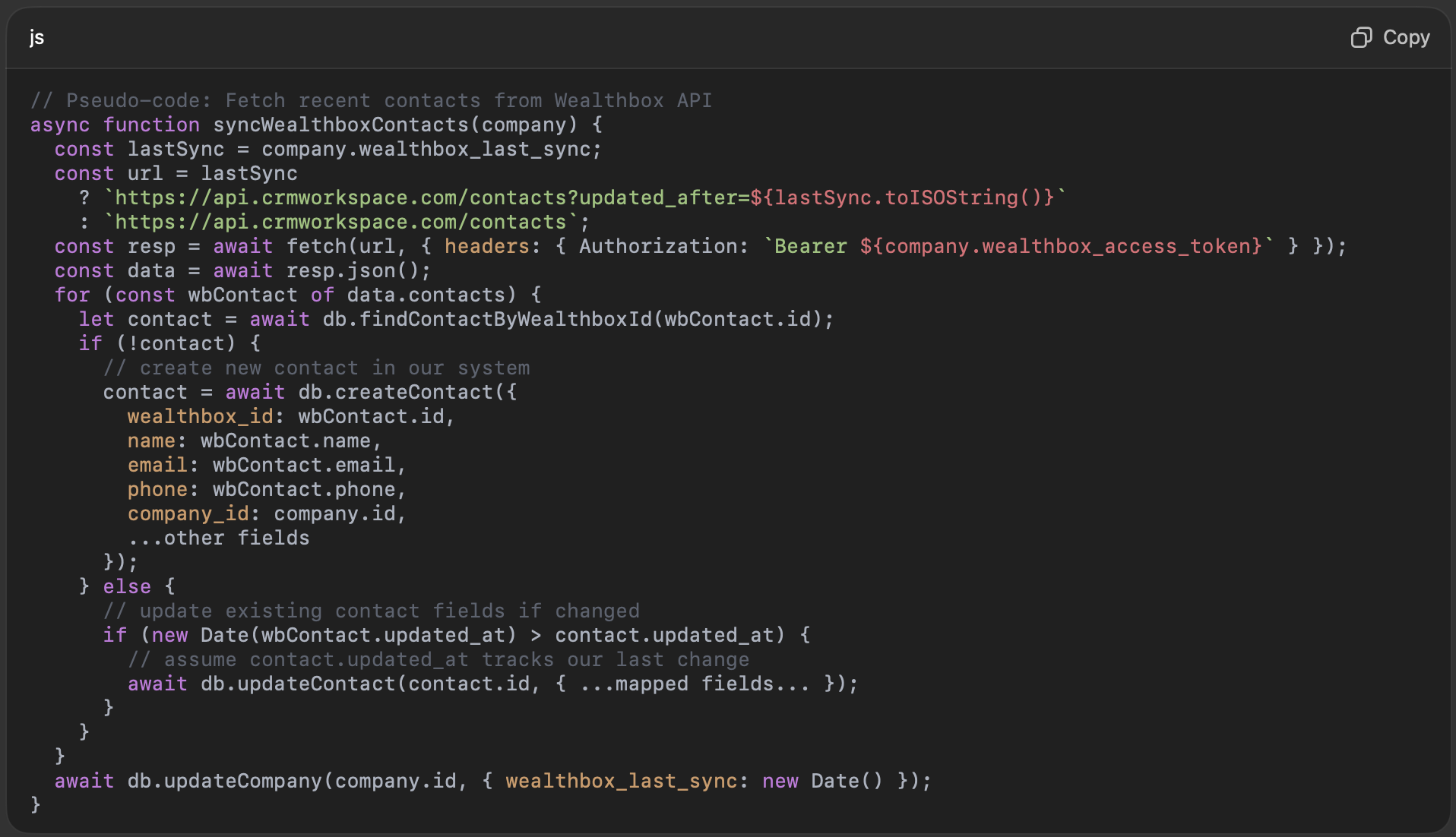
This is oversimplified, but shows the idea of using the updated_after filter and iterating. Similar logic applies to Salesforce (using SOQL queries with LastModifiedDate) and Redtail (likely an endpoint to get contacts with a changed date).
One particular challenge was custom fields. CRMs allow custom fields and different users might have different setups. We solved this by letting users map custom fields manually in a settings UI. For example, a user could map “Favorite Investment” (custom field in our platform) to a User-defined Field 1 in Redtail or a custom field API name in Salesforce. We then include those in sync processes.
It is worth noting that integrating with Salesforce opens up a wide array of possibilities beyond just contacts. But we kept our scope limited to contacts and leads (and related info) as required. The architecture is ready to extend to other objects (like pulling tasks or notes from CRM to show in our app, etc., in future versions).
Integration Results and Best Practices
After deploying the CRM integrations, our platform became much more integrated into users’ daily routines. They could trust that their contact databases were in sync and focus on crafting content and campaigns rather than exporting/importing CSV files. We learned a few lessons and best practices:
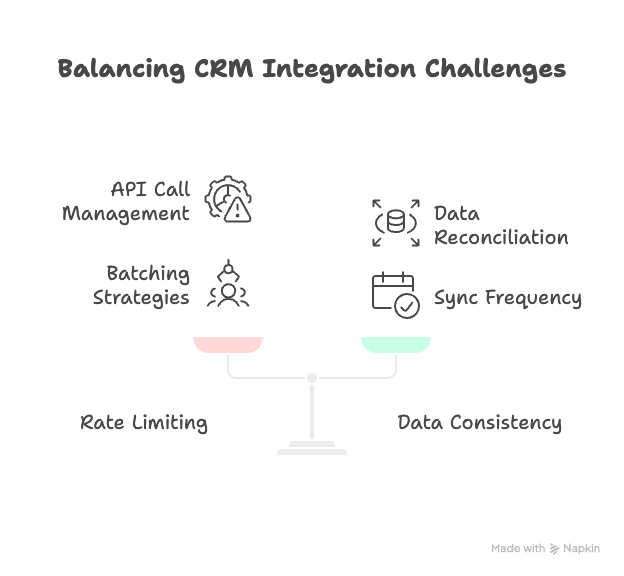
Rate Limiting and Efficiency: Each CRM had limits (Salesforce allows a certain number of API calls per 24-hour period, Redtail per minute, Wealthbox per second, etc.). We made heavy use of batch endpoints and webhooks to reduce load. For instance, if 100 contacts changed in Salesforce, instead of fetching them one by one, we use a bulk query to retrieve them in one call. Redtail’s API documentation indicated up to 1000 requests/min for professional plan , which is generous, but we still batched writes on our side to maybe 10 per second to be safe. Wealthbox specifically notes “throttling rate is one request per second… bursts above threshold are permitted, but exceeding gets 429 errors” , and their higher plans allow more calls per day . We built in backoff and retry logic for 429 (Too Many Requests) responses to ensure we don’t drop sync tasks.
Data Consistency: We found that having a single source of truth is easier, but in two-way sync you effectively have multiple sources (the CRM and our app). We aimed to minimize complex reconciliation by encouraging users to primarily add new contacts through our platform (which then pushes out). But realistically, advisors might add contacts on their phone app for the CRM etc. So our approach is to make sync frequent enough that differences are short-lived. In any case, we log all sync operations so if something went wrong, we could trace it.
Testing: We tested these integrations with sandbox accounts (Salesforce developer org, Redtail trial, etc.) and also with a few friendly beta users’ accounts to ensure real-world data (which might be messy or have surprises) didn’t break our logic. For example, Redtail may have contacts without email (we had assumed email as key in some matching logic – so we adjusted to also match by name or other fields).
In conclusion, the two-way CRM integration feature greatly enhanced the product’s value proposition. It positioned our platform not just as a standalone tool, but as part of the broader ecosystem that financial professionals use. By tracking contacts and leads along with their custom fields and details (like those important in financial services ), and keeping that data synced, we ensured marketing efforts stay aligned with client information. This fosters better personalization (e.g., an email can include the client’s first name or reference their financial goal, data which comes from the CRM).
The ability to suggest and incorporate custom fields also means our platform can adapt to various business needs. As suggested, we included ideas like capturing a lead’s “Risk Tolerance” or “Investment Horizon” as custom fields – these could be manually entered or perhaps in the future auto-filled from a CRM if present. While these were suggestions since the exact fields were not predefined, the flexibility exists to add them, thanks to the custom field support in both our system and the CRMs.
With integrations, we wrap up the functional aspects of the case study.
Lessons Learned and Conclusion
The journey from a WordPress MVP to a robust Node.js & Vue.js application was challenging but rewarding. In the end, the product evolved into a much more powerful Fintech marketing automation platform with a modern technology stack and a rich feature set. Here we summarize key lessons learned, both technical and organizational, and the outcomes achieved:
Importance of a Strong Architectural Foundation: Migrating off WordPress allowed us to design an architecture free of previous constraints. By separating the front-end and back-end and choosing scalable technologies, we set a foundation that can handle future growth. Early on, it was tempting to keep some ties to WordPress (for example, using WordPress as a headless CMS), but ultimately a clean break allowed full flexibility. We learned that investing time in a solid architecture (and database schema design) pays off later when adding features is simpler and performance is manageable.
Performance and Scalability Gains: The migration achieved its primary goal of improving performance. The new platform is faster for users and more efficient on the server side. One measure was that concurrent user tests that crashed the WordPress site were easily handled by the Node/Vue app with minimal server load. We also validated the advice that Node.js brings scalability and high throughput in web applications . Additionally, using modern front-end techniques (SPA, caching, CDN) drastically improved perceived performance. The team noted that after launch, support tickets about slowness or downtime virtually disappeared, whereas before, users often reported the WordPress site being slow or needing refreshes.
Feature Enhancements and User Value: Rebuilding the core features allowed us to refine them. We incorporated user feedback into the new implementations (for example, adding the calendar view, making the email editor more user-friendly, etc.). The addition of AI tools was a game-changer: users could create content in a fraction of the time. This not only differentiated our product in the market but also taught us how to integrate AI responsibly. We discovered that users were enthusiastic about AI-generated content but also appreciated that our platform enforced moderation and allowed them to tweak the output. By ensuring content validation/censorship via AI (to filter out any potentially harmful or off-brand content), we maintained content quality and compliance, which is critical in finance. The benefits of AI in content creation and moderation (speed, consistency, scalability) were clear, but we also confirmed that a human review layer is important – AI is an assistant, not a fully autonomous agent, especially in regulated industries.
Product Management and Iteration: Managing this project required balancing migration work with innovation. In hindsight, one lesson is that we might have delivered the migration in smaller increments if possible – however, due to the fundamental tech shift, a big bang release was chosen (i.e., we built the new system in parallel and then onboarded users onto it). We prepared for this by running a beta program where a subset of users tried the new app while the old one was still running, which provided valuable feedback and confidence before full cutover. The product management team also learned the value of prioritizing critical features for the initial launch, and then quickly following up with enhancements. For example, multi-tenancy (company management) was originally planned later, but we realized it’s easier to build in at the architecture level from the start than bolt it on, so we implemented the company ID structure early. This decision proved wise when we later onboarded a large enterprise client who required segregated data and custom roles – the system was ready for it.
Integration Ecosystem: The CRM integrations taught us a lot about working with external APIs and the necessity of playing well with others in a fintech environment. We found that each system (Salesforce, Redtail, Wealthbox) had its quirks, but by leveraging their APIs we significantly increased our platform’s utility. A client testimonial noted that having their contacts auto-synced saved them hours each week and reduced errors from manual data entry. The integration experience underscores that no modern app is an island – being able to integrate (via REST APIs, OAuth, webhooks, etc.) is essential. We also had to build robust error handling around these: e.g., if Salesforce’s API is down or credentials expire, we alert the user to reauthenticate. Monitoring integration jobs was added to our admin console so we can assist if something fails (like a bad data format causing an API call to fail).
Maintenance and Future-Proofing: Maintaining a custom Node/Vue app is a different challenge from maintaining WordPress. We now handle everything from security patches of dependencies to scaling infrastructure. However, we consider this a positive trade-off because we have full control. We set up CI/CD pipelines for automated testing and deployment, something that was harder to do in the WordPress context. With Node.js, updating to newer versions or switching out components (e.g., we later moved from Express to a Fastify for even better performance) is possible without rewriting the whole thing. On the front-end, we plan to keep up with Vue.js upgrades (Vue 3 is already in use, and we structure code to be upgradable). Essentially, we’ve positioned the product to use modern best practices (containerization, automated tests, modular code), which will help it evolve. We are also mindful of modern web architecture trends such as microservices or serverless – while our app is currently a fairly monolithic Node API, we have started to break out certain tasks (like the AI generation and email sending) into separate services or lambdas for better scalability and isolation. Microservices and containerization can make applications more modular, scalable, and resilient , and we are leveraging that gradually.
Challenges: Not everything was smooth sailing. Some notable challenges included data migration (ensuring nothing was lost between WordPress and the new system – we ended up writing scripts to migrate every piece of relevant data and had multiple dry runs), user transition (training users to use the new interface – we offered webinars and guides, as it was a big change from the old WordPress admin-like UI), and scope management (it was tempting to add many new features; we had to stick to the plan to deliver core first, then extras). Also, building an AI feature was new to the team, so we had to experiment with prompt design and deal with API costs – we implemented caching of AI outputs and prompts to avoid unnecessary calls, and we monitored usage to stay within budget. We also had to carefully handle PII (personally identifiable information) when sending data to AI APIs, ensuring not to send any sensitive data in prompts to comply with privacy (for example, we wouldn’t send actual client names to the AI when generating generic content; we’d use placeholders).
User Impact: The ultimate measure of success is user adoption and satisfaction. Upon launching the new platform, we surveyed users and found significantly higher satisfaction scores for speed, ease of use, and functionality. Many users were particularly impressed by the AI writer and the integrated calendar – features they didn’t have before. The WordPress MVP helped validate the product idea initially, but this new implementation is what truly delivered on the promise and started scaling the business. The case study shows how an MVP can be used to learn and then one must be ready to rewrite or migrate for the sake of a solid product. It echoes the common startup journey: use quick tools (like WordPress) to get started, but be prepared to move to a custom, scalable solution when you find product-market fit.
In conclusion, the migration to Node.js and Vue.js transformed the Fintech Automation product into a scalable, feature-rich web application that integrates AI capabilities and connects seamlessly with industry tools. We successfully migrated the functionality (content generation, social posting, email campaigns, landing pages) and greatly enhanced it (AI content generator, better UI, automation workflows, scheduling calendar, multi-company support). We also fulfilled the requirement of synchronizing contacts/leads with major CRMs, suggesting and mapping relevant fields to ensure all client data stays consistent . The platform now stands on a robust architecture, delivering fast performance and the ability to continuously evolve.
This project demonstrates how reengineering an MVP with modern technologies can unlock potential that was previously held back by legacy constraints. By carefully planning the migration, listening to user needs, and embracing innovations like AI, we turned a simple MVP into a competitive product in the fintech marketing space. The lessons learned here can inform similar journeys for other teams facing the limits of an initial prototype and deciding to invest in a scalable, future-proof solution.



![[SIGNALS] Interview with Bettina Rubek Slater](https://insart.com/wp-content/uploads/2026/06/signals-interview-with-bettina-rubek-slater-300x169.png "The Fortnight That Could Save Your Startup: Interview with Bettina Slater")


